Agent-free console for Kubernetes and Amazon ECS

See every cluster. Fix what's wrong.

K8sConsole puts live maps, monitoring, logs, shells, security checks, access control, Helm and an AI assistant into one fast desktop app, for Kubernetes and Amazon ECS. It connects straight from your kubeconfig and your AWS profiles, and installs nothing in your clusters.

No agents in your cluster No account or telemetry Kubernetes and Amazon ECS in one app
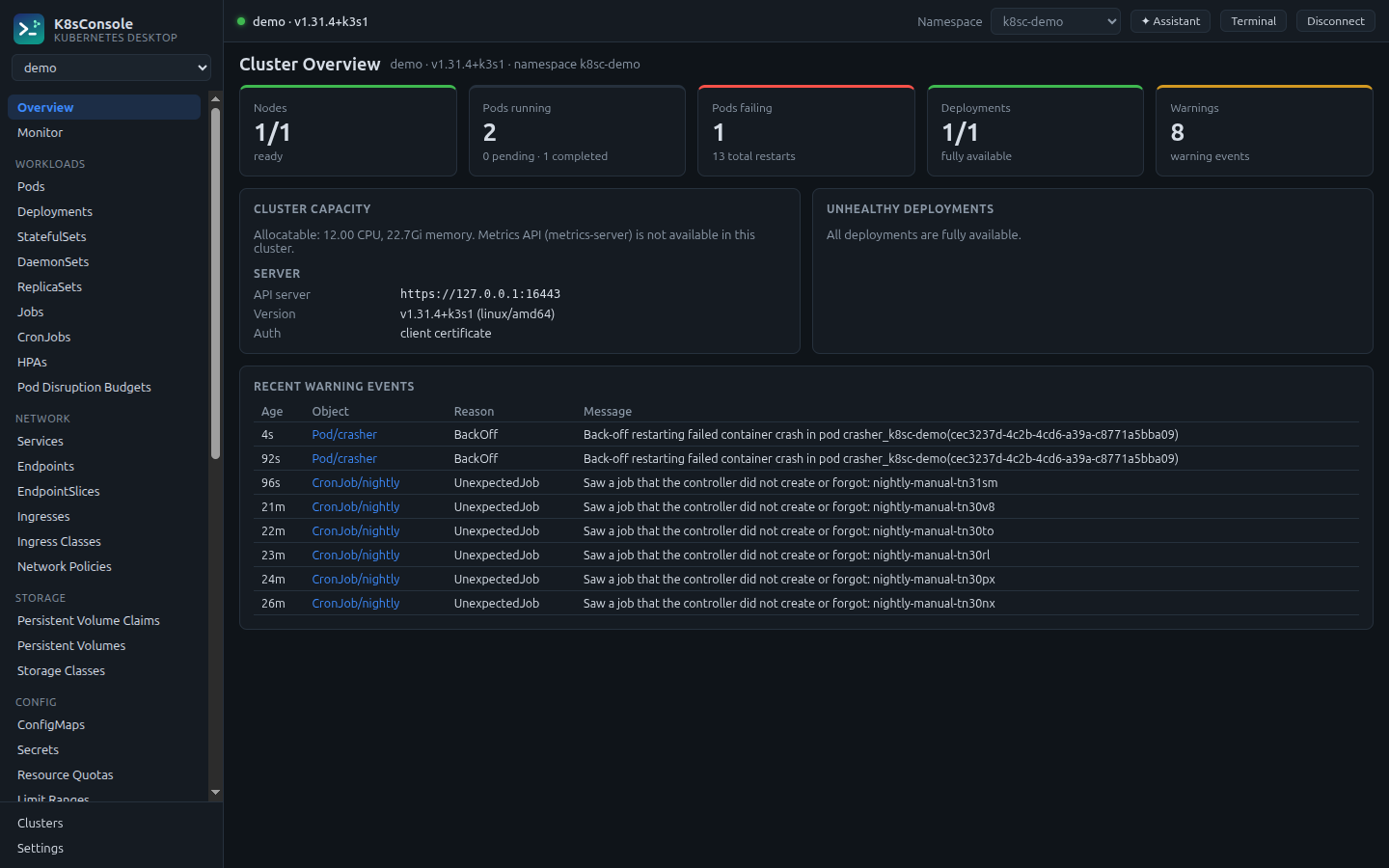
K8sConsole cluster overview with node readiness, pod health, deployment availability, capacity and recent warning events
Cluster Map & Relationships

Understand a namespace in one glance

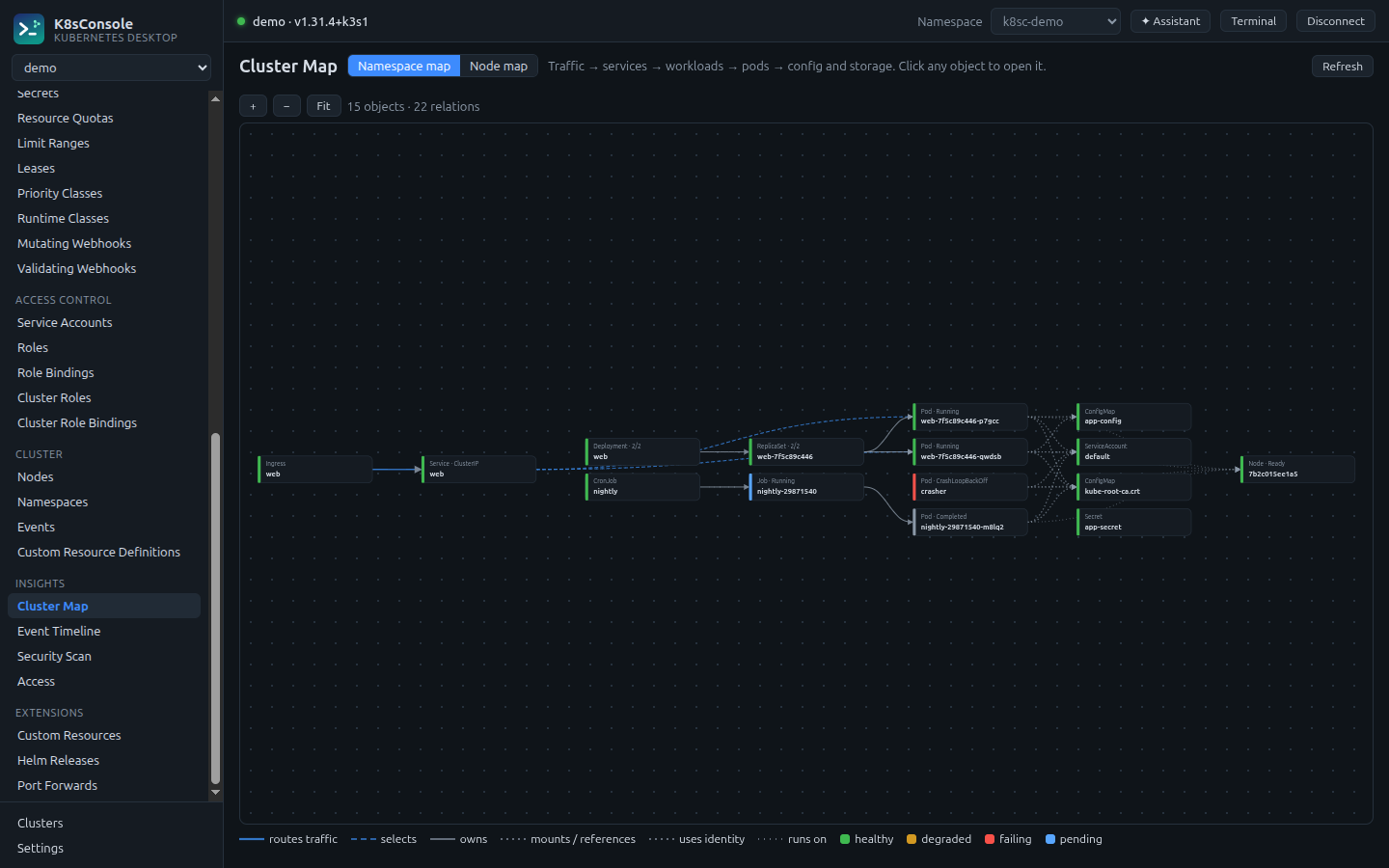
Traffic flows left to right, from Ingress to Service to workloads to pods to the config and storage they depend on, and every box is coloured by health. Click anything to open it. Every object also gets its own relationship graph.

  • Ownership, selectors, routes, mounts, volumes, identities and network policies
  • A node map shows every pod placed on its node
  • Live: updates as your cluster changes
Cluster Map showing an Ingress routing to a Service, a Deployment with its ReplicaSet and pods, and the ConfigMaps, Secrets and node they use
Amazon ECS

Your ECS services, next to your Kubernetes clusters

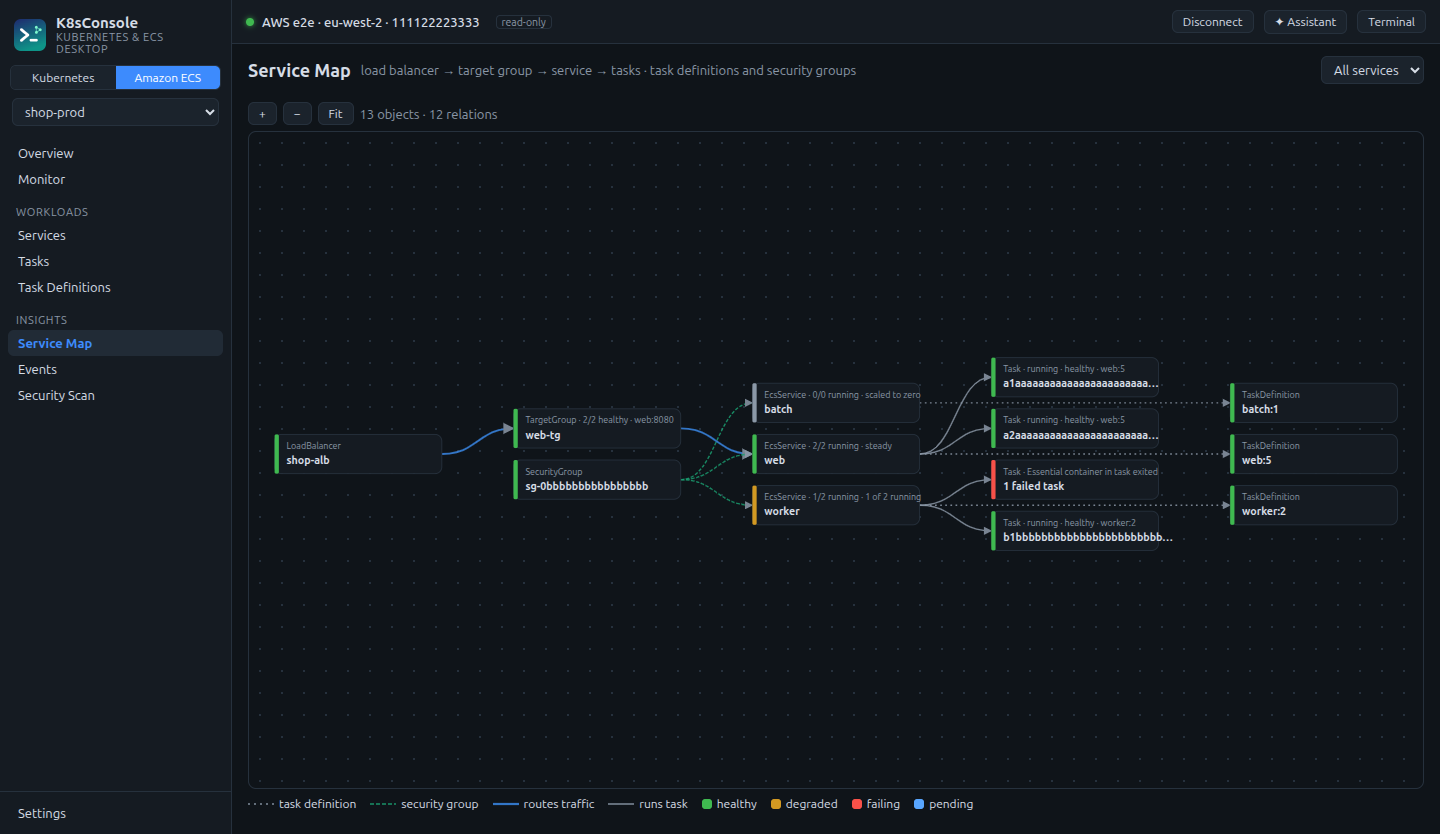
Switch the sidebar to Amazon ECS and connect with an AWS profile or your IAM role. Services, tasks and task definitions are live, with CloudWatch logs, CPU and memory charts, load balancer health and a service map from the load balancer down to every task.

  • Read-only by default: no change leaves the app until you switch it off
  • Stopped tasks with stop reasons and exit codes, so crashes are easy to explain
  • Scale, redeploy, roll back a revision, run one-off tasks and open ECS Exec shells, each with a confirmation
  • An ECS security scan for task definitions, services and open security groups
Amazon ECS service map: a load balancer routing to a target group and service, its running tasks, a failed task, task definition revisions and the security group
ECS services and tasks

Deployments, events, logs and health in one panel

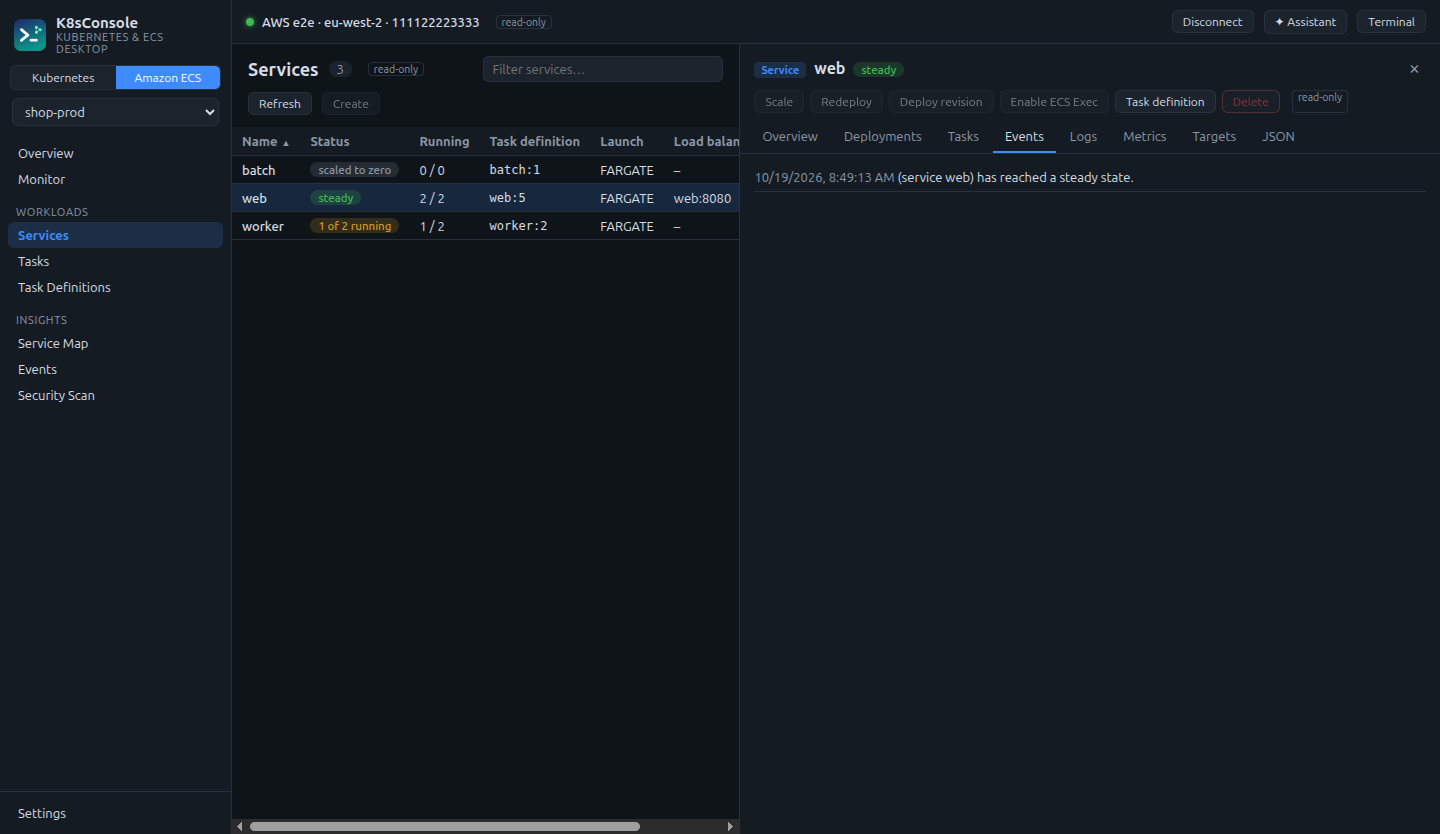
Open a service to see its rollout, the tasks it runs, the latest service events, CloudWatch logs from every task, utilization over time and the health of each load balancer target.

  • Edit a task definition as JSON and register it as a new revision
  • An AWS shell in the integrated terminal, bound to your profile and region
Amazon ECS services list with status and running counts, and a service details panel with deployments, tasks, events, logs, metrics and targets tabs
Monitor

Live usage, without installing anything

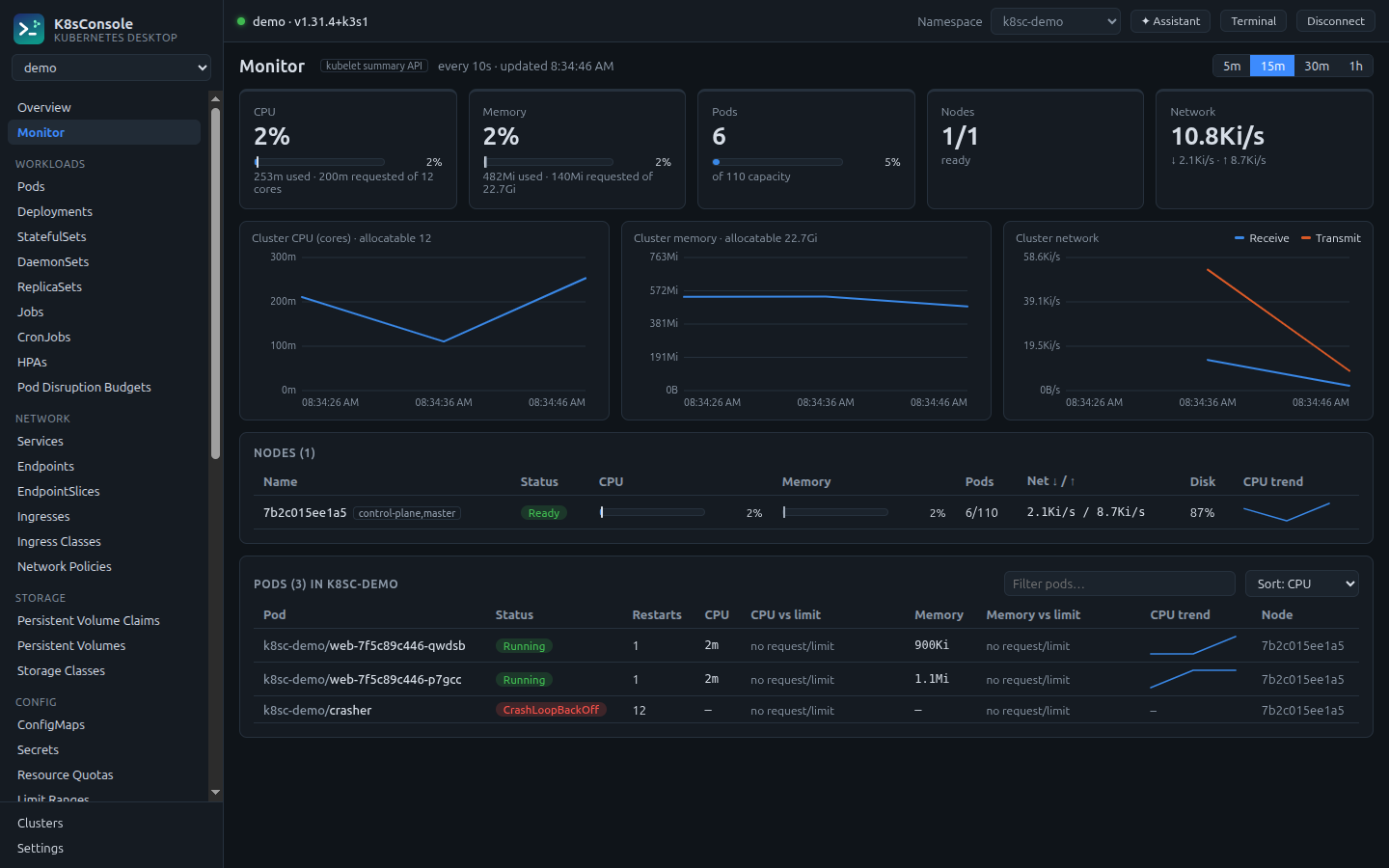
CPU, memory, network and disk for the cluster, every node and every pod, with an hour of history. Usage bars show requests and limits, so you can see what's oversized and what's about to be throttled.

  • Reads the kubelet Summary API, or metrics-server when available
  • Sort pods by CPU, memory or restarts and drill into any of them
Monitor view with cluster CPU, memory and network charts and a node usage table
AI Assistant

Ask why. Get evidence, then a fix you control.

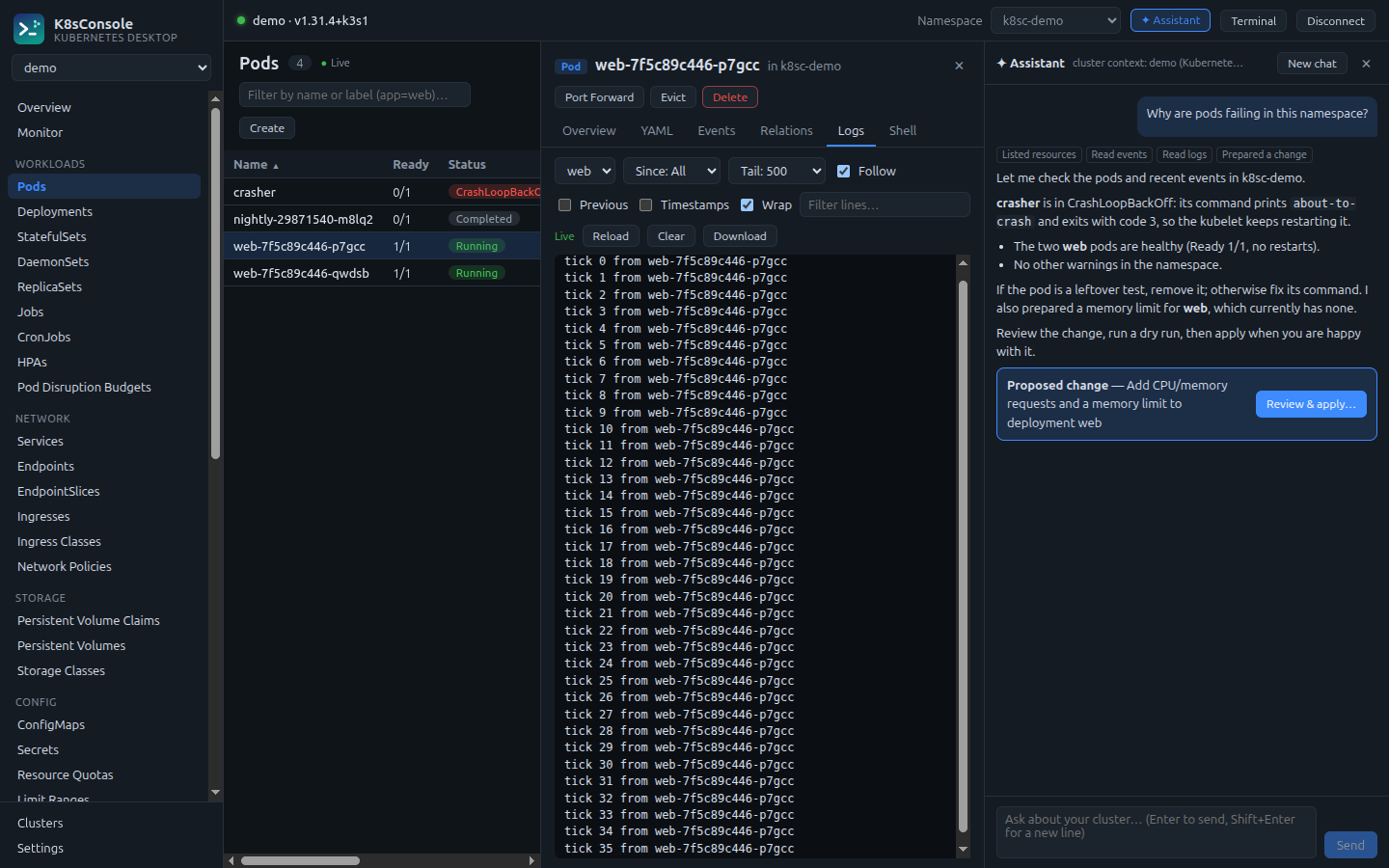
Ask a question in plain language. The assistant investigates with read-only tools (resources, events, logs, metrics, security findings) and explains what it found. When a change would help, it drafts the manifest for you to review, dry-run and apply.

  • It never changes your cluster on its own
  • Secret values are never sent; log access is your choice
  • Bring your own Claude API key, stored encrypted on your machine
AI Assistant explaining that a pod is crash-looping, with a proposed change ready for review
Security Scan & Access

Find risky settings. Fix them in one click.

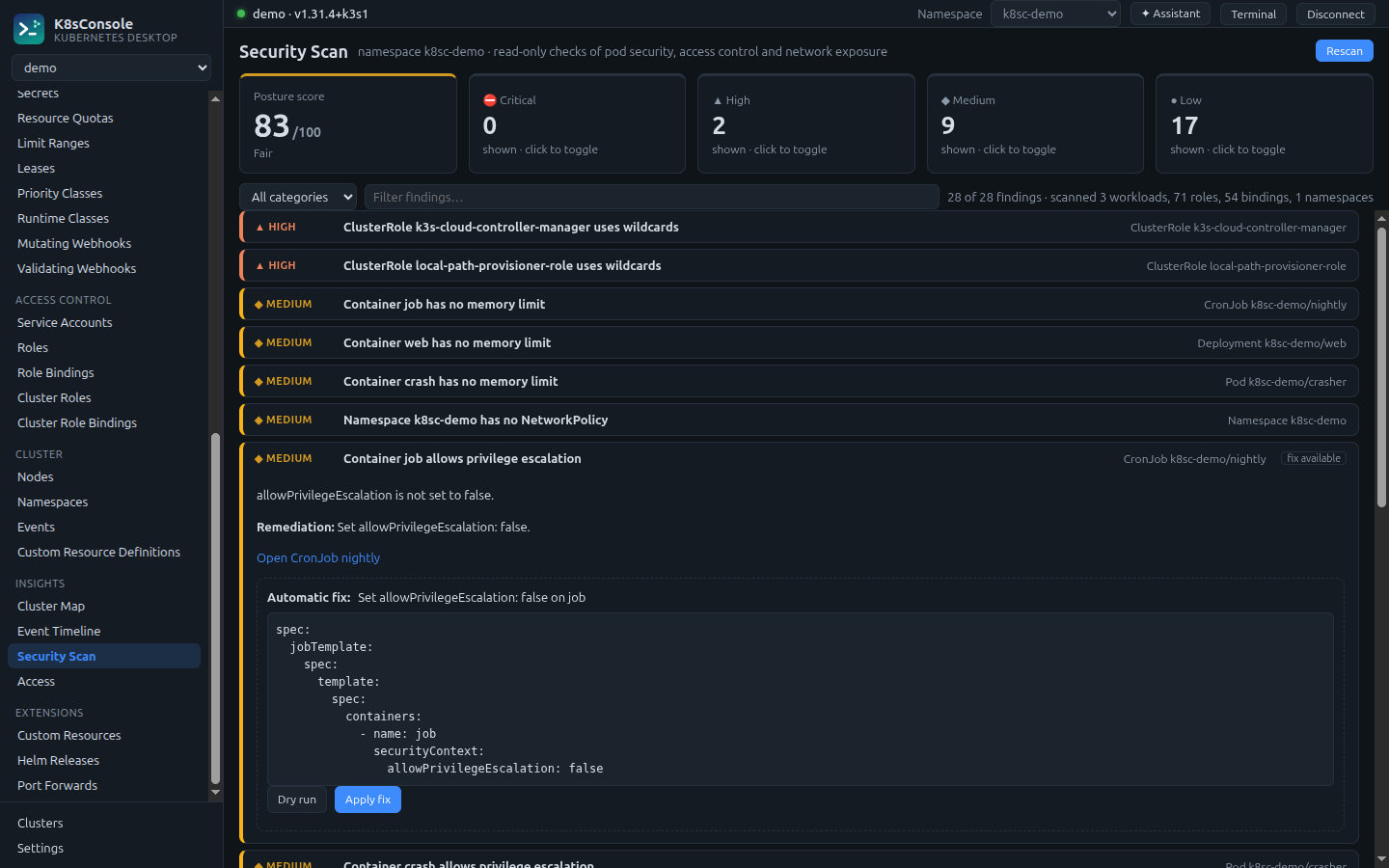
Checks pod security, RBAC and network exposure, gives a posture score, and explains every finding in plain language. Safe fixes come with the exact patch, a server-side dry run and an apply button.

  • Privileged containers, host access, root users, missing limits, wildcard roles, exposed services
  • "Who can delete pods here?", a permission matrix for any user, group or service account, and a visual role editor
Security Scan with a posture score, severity counts and an expanded finding offering an automatic fix
Terminal

A real terminal that already knows your cluster

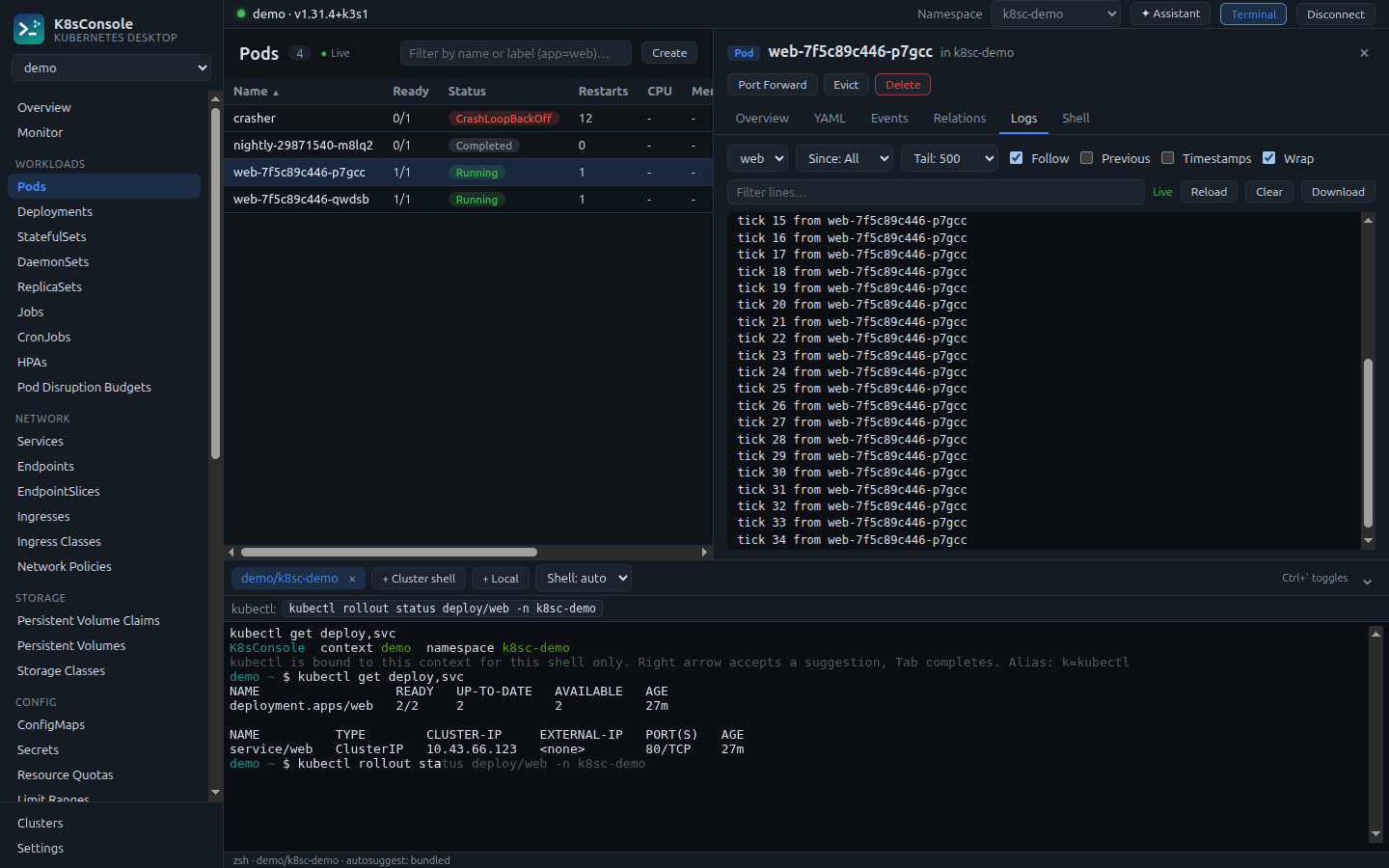
Open zsh or bash in a dock. Cluster shells are bound to the selected cluster and namespace without touching your kubeconfig. kubectl completion is loaded, and inline suggestions offer the commands you're most likely to need for the objects in front of you.

Integrated terminal with an inline kubectl suggestion and a suggestion bar
Event Timeline

See incidents unfold

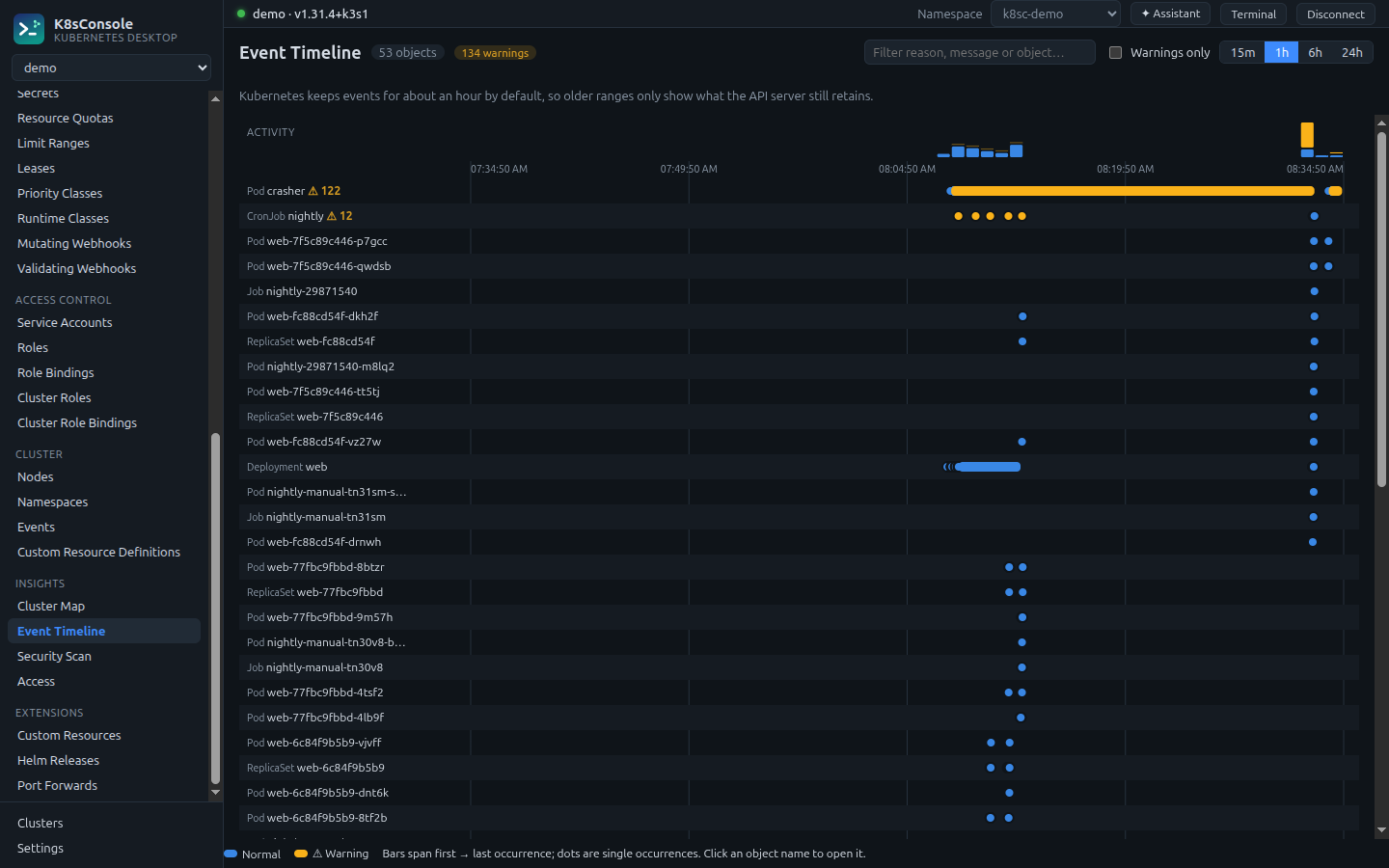
Events laid out per object over time, with an activity strip and warnings highlighted, so the crash loop, the failed mount and the rollout line up on one screen.

Event timeline with one lane per object and a warning bar spanning a crash loop

Everything you reach for, in one place

Built for the daily work of running Kubernetes and Amazon ECS, from the first look to the fix.

Live resources

38 built-in kinds and every custom resource, with live updates, sorting and label filters.

YAML with guard-rails

Live validation, server-side dry run, conflict detection and create-from-YAML.

Logs

Follow, previous container, timestamps, since/tail, search and download.

Pod shells

Interactive shells in any container, with bash, then sh, detected automatically.

Port forwarding

Pods and services, named ports, local-only listeners, one place to manage them.

Helm

Repositories, chart search, install and upgrade with dry run, history and rollback.

Safe actions

Scale, restart, evict, cordon, drain and CronJob runs. Every change asks first.

Every cluster

All your kubeconfigs, kubectl auth plugins, OIDC tokens, proxies and automatic reconnects.

Secure by design

Your clusters and credentials stay yours.

Nothing in your clusterK8sConsole talks to the Kubernetes API with your existing credentials. No agents, no operators, no CRDs.
Credentials never reach the UIKubeconfigs are read in an isolated background process. The interface runs in a sandbox with no network access.
Changes are explicitEdits and fixes run a server-side dry run, show what will change and ask before applying. Deletes require typing the name.
No telemetryNo account, no licence server, no usage tracking. The AI Assistant is off until you add a key.

Download K8sConsole

Version 1.3.0 for Linux, macOS and Windows. Free and open source (MIT).

sudo apt install ./k8sconsole_1.3.0_amd64.deb
k8sconsole

Optional: kubectl for terminal completion, zsh for inline suggestions (Linux and macOS), helm 3 for Helm features, the aws CLI for the AWS shell tab (ECS Exec shells are built in).

Version
1.3.0 · release notes
Linux
Ubuntu 22.04+ / Debian 12+, x86-64
macOS
Apple Silicon or Intel. Not notarized by Apple yet, so the first launch says Apple “could not verify” the app: click Done, then System Settings → Privacy & Security → Open Anyway. Once per version.
Windows
Windows 10/11, x64. Not code-signed yet: in SmartScreen choose More info → Run anyway.
Checksums
SHA256SUMS.txt, e.g. sha256sum -c SHA256SUMS.txt --ignore-missing

Questions

Do I need to install anything in my cluster?

No. K8sConsole uses the Kubernetes API with the credentials in your kubeconfig. Monitoring reads the kubelet Summary API through the API server, or metrics-server if you have it.

Which clusters does it work with?

Any conformant Kubernetes cluster your kubeconfig can reach, self-hosted or managed. Cloud providers' sign-in plugins work the same way they do with kubectl: if kubectl can connect, K8sConsole can.

How does it connect to Amazon ECS?

With the AWS credentials you already use: a profile from ~/.aws (access keys, IAM Identity Center, or a profile that assumes a role), or the default credential chain, including the IAM role of the EC2 instance or container it runs on. You can also assume a role from the app. Keys stay on your machine and are never shown in the app.

Can it change my ECS services by accident?

AWS connections start read-only, and in that mode every create, update, stop or delete call is refused before it leaves the app. When you switch read-only off, each change still asks for confirmation, and deleting a service or scaling it to zero asks you to type its name. For extra safety, connect with a role that only has read permissions.

What does the AI Assistant send, and where?

Only when you use it: your question plus the cluster data it reads to answer (for example resource summaries, events and, if you allow it, log lines) go to the Claude API using your own API key. Secret values and credential-looking environment values are never sent. It can't change your cluster; you review and apply its proposals yourself.

Will it change anything without asking?

No. Every change shows a confirmation, edits support server-side dry runs, and destructive actions ask you to type the resource name.

macOS says it “could not verify K8sConsole is free of malware”. Is it safe?

macOS shows this for every app that isn't notarized by Apple; it doesn't mean anything was found. K8sConsole is open source and built by a public GitHub workflow. Every download has a checksum, a software bill of materials and signed build provenance you can verify (gh attestation verify <file> --repo AAnkitpatel/k8sconsole). To open it: click Done, go to System Settings → Privacy & Security, scroll down and click Open Anyway. Or run xattr -dr com.apple.quarantine /Applications/K8sConsole.app. Notarized builds are planned, and they won't show the warning.

Which platforms are supported?

Linux (a .deb for Ubuntu and Debian, x86-64), macOS (Apple Silicon and Intel) and Windows 10/11 (x64). Every installer is built and tested on its own operating system before each release.